

What is QoreDB
A modern, fast, and intuitive desktop database client built for developers. A lightweight alternative to DBeaver and pgAdmin.
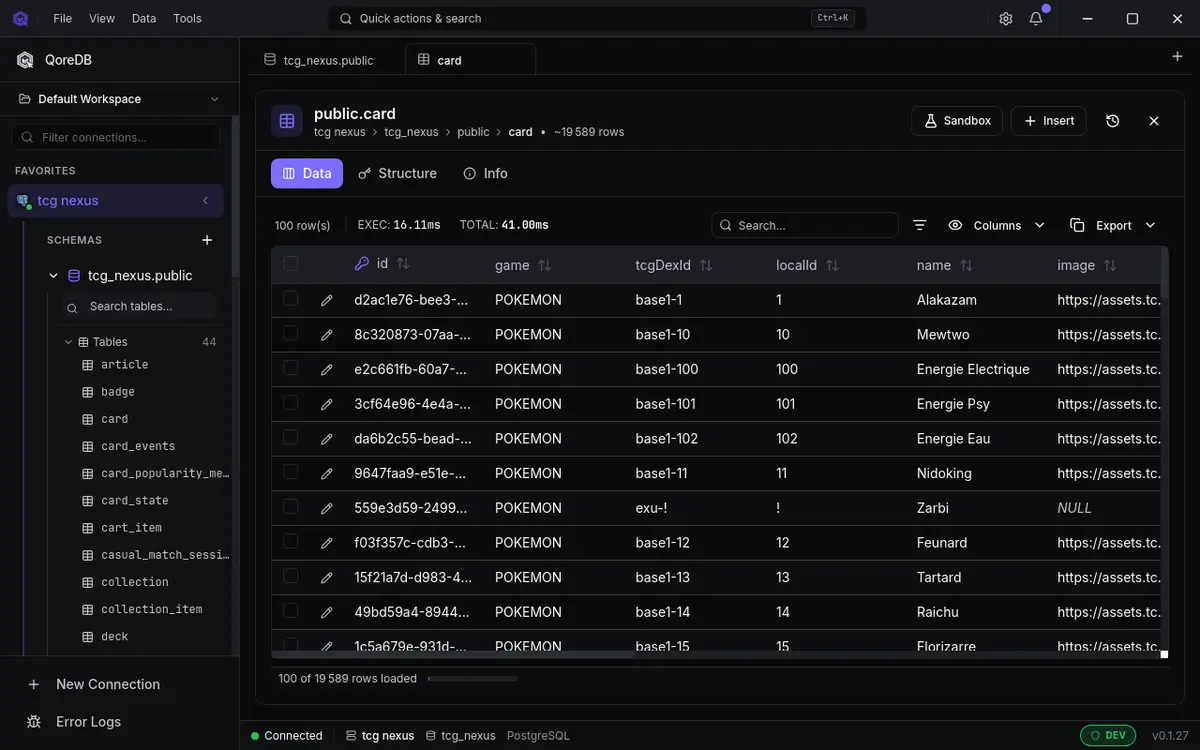
QoreDB is a desktop database client for developers. From a single application, you can connect to PostgreSQL (and Supabase, Neon, TimescaleDB), MySQL/MariaDB, SQL Server, SQLite, DuckDB (and MotherDuck), MongoDB, Redis, CockroachDB, ClickHouse, Elasticsearch and OpenSearch, browse schemas, write queries, edit data, and run notebooks.
It is built with Tauri, React and Rust, which means a small native binary, fast startup, and low memory usage compared to Electron-based clients.
Who it is for
QoreDB is designed for developers who want a tool that gets out of the way:
- Backend and full-stack engineers who switch between several databases per day and don't want a separate client per engine.
- Data engineers who need to inspect, federate and export data across heterogeneous sources.
- DBAs and SREs who care about safety in production: read-only mode, environment guards, audit logging.
- Open-source enthusiasts who prefer transparent tooling over closed proprietary clients.
Whether you are connecting to a local Postgres for the first time or managing dozens of production connections, QoreDB scales from "minimal effort" to "advanced workflow" without forcing complexity on you.
What you can do with QoreDB
The feature set is broad, but it organizes around four pillars:
Connect to anything. PostgreSQL (and Supabase, Neon, TimescaleDB), MySQL/MariaDB, SQL Server, SQLite, DuckDB (and MotherDuck), MongoDB, Redis, CockroachDB, ClickHouse, Elasticsearch, OpenSearch. Driver auto-detection from the connection string: paste a DSN and QoreDB picks the right driver automatically. SSH tunneling with proxy jump support is built-in.
Query and explore. A polished SQL editor with syntax highlighting, autocomplete and snippets. A dedicated MongoDB editor with collection and operator autocomplete plus aggregation pipeline validation. A type-safe multi-dialect query builder (QoreQuery) for portable queries. Interactive ER diagrams and execution plan visualization. A high-performance virtualized data grid with server-side filtering, sorting and pagination.
Edit and manage data safely. Inline row editing across SQL and NoSQL, multi-row bulk edits with live SQL preview, CSV import with auto-detection, transactions with explicit commit/rollback, and a sandbox mode that isolates your local changes and generates migrations.
Stay productive every day. A workspace concept that groups connections, queries and notebooks per project. Multi-tab editor with drag-and-drop reorder and tab groups. Database notebooks (.qnb) mixing SQL/Mongo and Markdown cells with parameterized variables, perfect for runbooks, postmortems and shareable analyses. Global search with Cmd/Ctrl + K. Dark and light themes. Available in 9 languages.
Why QoreDB exists
The state of database clients on the desktop is split between two extremes. On one side, free tools that are powerful but heavy and dated (DBeaver, pgAdmin, MySQL Workbench). On the other, polished proprietary tools locked behind expensive subscriptions.
QoreDB sits in the middle: a modern, native, performant client with a generous open-source core and a sustainable Pro tier for advanced features. The goal is to make a tool you actually enjoy using all day, without sacrificing capability or asking you to pay before you've even tried it.
How it is built
The frontend is React 19 with TypeScript and Tailwind. The backend is Rust, with sqlx for SQL drivers, native MongoDB and Redis drivers, embedded DuckDB for analytics and cross-database federation, and a Tauri command layer that bridges the two. Credentials are stored in the OS native keychain, encrypted with Argon2.
If you care about the internals, the Open Core model page explains what's open source and what's not, and why.
Where to go next
If you've never used QoreDB before, start with Installation, then walk through Your first connection and the Interface tour. Twenty minutes total and you'll have a complete mental model of the product.
If you're already familiar with database clients and want to jump in:
- Keyboard shortcuts: the cheat sheet
- Connection URLs: DSN formats per driver
- Driver limitations: what differs between engines
Stay updated on new releases
Subscribe to get product releases, new drivers notifications, and technical tutorials.