

Installation
Install QoreDB on macOS, Windows or Linux. Pre-built binaries, Arch AUR package, or build from source.
QoreDB ships as a native desktop application for macOS, Windows and Linux. Installing takes about a minute on any platform.
System requirements
QoreDB is light. The binary is a few tens of megabytes and the app uses a fraction of the memory of Electron-based clients.
| Platform | Requirement |
|---|---|
| macOS | macOS 10.15 (Catalina) or later. Native builds for Apple Silicon and Intel. |
| Windows | Windows 10 or later (x64). Includes WebView2, installed automatically if missing. |
| Linux | Modern distro with webkit2gtk 4.1, glibc 2.31+. Tested on Ubuntu 22.04+, Debian 12+, Fedora 38+, Arch. |
Download a pre-built release
The fastest way to install QoreDB is to grab the installer for your platform from the Releases page.
| Platform | Format | Notes |
|---|---|---|
| macOS | .dmg | Two builds: ARM64 (Apple Silicon) and Intel (x64). |
| Windows | .msi or .exe | The .msi installer is recommended for managed environments. |
| Linux | .deb or .AppImage | .deb for Ubuntu/Debian. .AppImage is portable, no install required. |
macOS
- Download the
.dmgmatching your CPU. Apple Silicon needs ARM64, older Macs need Intel. - Open the
.dmg, drag QoreDB into your Applications folder. - The first time you launch it, right-click the app and choose Open to bypass the Gatekeeper warning. macOS will remember the choice.
Windows
- Download the
.msiinstaller. - Double-click to run the installer and follow the prompts.
- Launch QoreDB from the Start menu.
If you prefer the standalone .exe, double-click it directly. No install required, but updates are manual.
Linux
Debian / Ubuntu, use the .deb package:
sudo dpkg -i qoredb_*.deb
sudo apt-get install -f   # resolve any missing dependencies
Any distro, use the .AppImage:
chmod +x QoreDB-*.AppImage
./QoreDB-*.AppImage
Arch Linux, install from the AUR:
yay -S qoredb-binBuild from source
If you want the absolute latest, want to contribute, or are on a platform without a pre-built binary, build from source.
Prerequisites:
- Node.js 18 or later
- pnpm
- Rust 1.70 or later (
rustupis the easiest way to get it) - Tauri system dependencies for your platform
Ubuntu / Debian system packages
sudo apt-get update
sudo apt-get install -y \
  pkg-config \
  libglib2.0-dev \
  libgtk-3-dev \
  libwebkit2gtk-4.1-dev \
  libayatana-appindicator3-dev \
  librsvg2-dev
Then clone, install, and build:
git clone https://github.com/QoreDB/QoreDB.git
cd QoreDB
pnpm install
pnpm tauri dev      # development mode with hot reload
pnpm tauri build    # production build, output in src-tauri/target/release/
A production build produces a native installer for your platform (.dmg, .msi, .deb, .AppImage) under src-tauri/target/release/bundle/.
Verify the installation
Launch QoreDB. You should see the welcome screen with the connection sidebar on the left and an empty workspace area in the center.
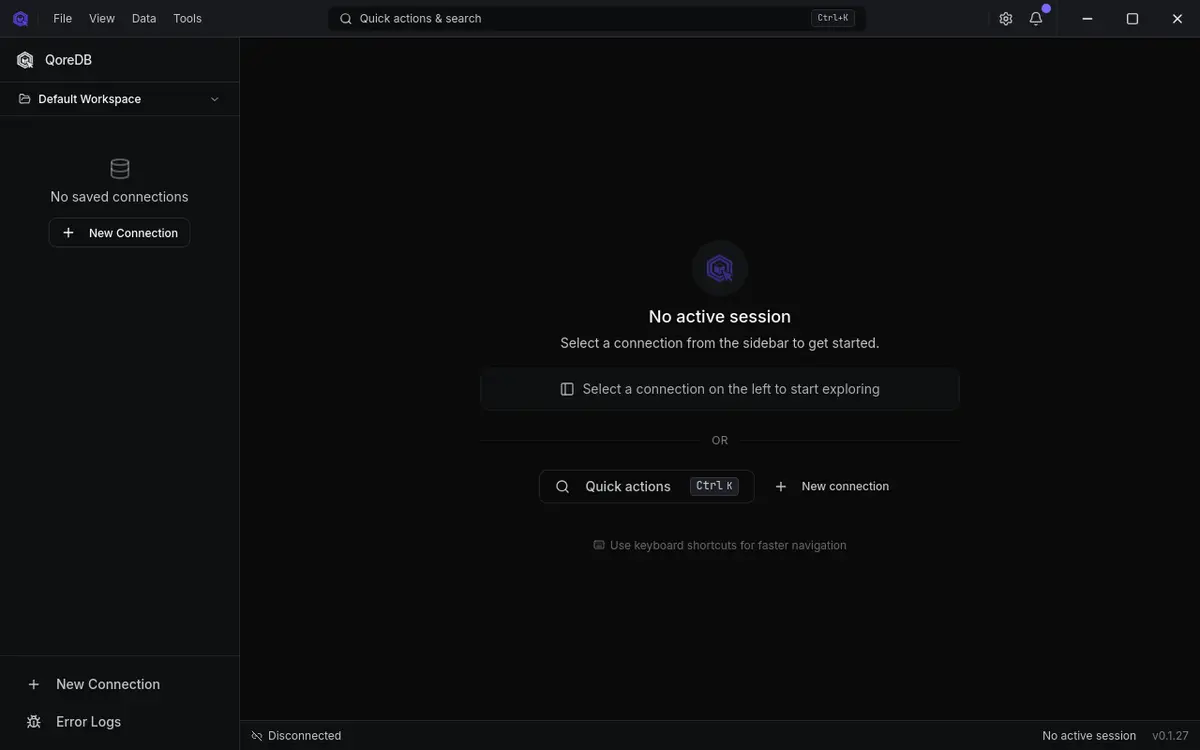
You can confirm the version installed via the General menu (Settings → General → About), or in the bottom-right corner of the window.
Updating
QoreDB checks for updates on startup. When a new version is available, you will see a banner offering to download and install it. Updates preserve your connections, vault, query history and notebooks.
If you installed via the Arch AUR or from source, update through your usual flow (yay -Syu qoredb-bin or git pull && pnpm tauri build).
Uninstalling
| Platform | Steps |
|---|---|
| macOS | Move QoreDB out of Applications. App data lives in ~/Library/Application Support/com.qoredb.*. |
| Windows | Use Settings → Apps → QoreDB → Uninstall. App data is under %LOCALAPPDATA%\com.qoredb.*. |
| Linux | .deb: sudo apt remove qoredb. .AppImage: just delete the file. App data is under ~/.local/share/com.qoredb.* and ~/.config/com.qoredb.*. |
Where to go next
- Your first connection: connect to a database in under a minute
- Interface tour: get familiar with the main UI
及时了解最新动态
订阅我们的通讯,获取版本发布、新驱动通知和技术教程。